

Product
How xbin works.
xbin is a workspace where people and AI agents build the systems a company runs on, and where those systems run. You work in it from the browser, from a terminal with bx, or from your iPhone.
01 · Underneath
xbin runs what you build.
Underneath the workspace, xbin watches every app’s folder. When a file changes, it rebuilds what changed and swaps the new version in.
Every call between apps, people, agents and the outside world passes through xbin. It checks who is calling and what they have been granted, so an app never has to check its callers itself.
Save, and it is live.
Saving a change puts it live. The page reloads in every open window. A backend rebuilds, and the new version starts before the old one stops.
- page saved to page on screenunder0.35 s
On a 96-core workstation, a saved page is on screen in under 0.35 s, including a deliberate 0.3 s settle.
- reads failed in 60 live updates0
On a 96-core workstation, 0 of 5.39 million reads failed across 60 live updates under load, at about 30,000 requests a second.
The settle lets a save of several files land as one change. Writes that land at the exact moment of an update can fail: 15 of 2.34 million did. A client that retries a failed write it can safely repeat covers them.
02 · The workspace
Your systems, side by side.
The workspace opens in the browser. People open, arrange and use their apps there, and each app has its own terminal.
The workspace is built the same way as everything in it: the shell, the admin console and the app manager are apps, and you change them like any other.
Typing feels local, even far away.
With a 300 ms round trip, what you type appears within one frame (≤ 17 ms). Measured on a 96-core workstation; the prediction runs in the browser.
With prediction off, the same characters appear after 0.3 s. Prediction turns on by itself once the link is slower than 100 ms. Timed for characters typed one at a time at a prompt.
03 · Apps
A system is a folder.
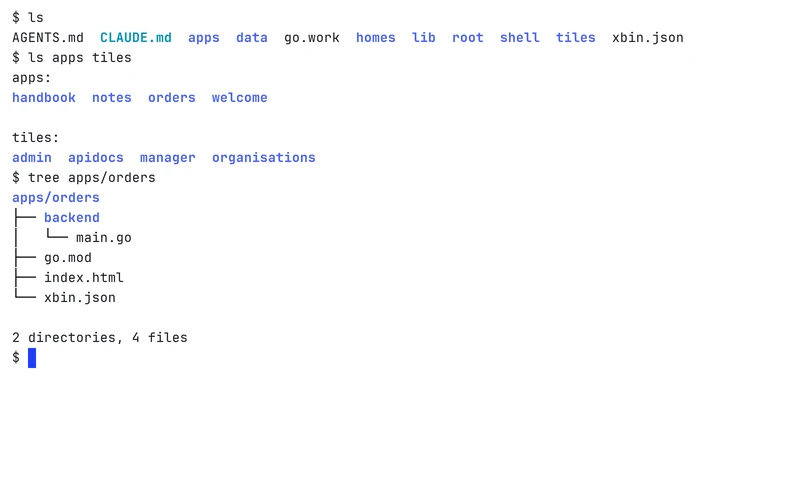
Each app is a folder: a page, an optional backend, and its own history of changes. Move the folder and the app is renamed. Copy it and you have a fork.
Each app has its own identity, its own grants, an encrypted vault for its secrets, and its own storage: a database, key-value storage, file storage, a message bus and scheduled jobs.
04 · Agents
Agents build the systems.
Describe what you need, and an agent builds the app or changes it.
The built-in agent
It can run long tasks, use tools and subagents, run on schedules and triggers, and talk through chat channels.
Coding agents
Claude Code, Codex, Gemini CLI and opencode work in the workspace, each in its own sandbox. A person signs each one in once, and the sign-in is reused.
Sandboxes
Every app and every agent works in its own sandbox. Nothing inside reaches the network, another app, a GPU or stored data until someone grants it.
05 · Per person
A copy of the app for each person.
An app can run one copy for each person. Other people cannot read it, and admins do not open it.
On a 96-core workstation, a person’s own copy of a small app starts on their first request in under 0.3 s, then answers in about a millisecond.
Measured on a small notes app.
06 · Grants
Nothing gets out until it is granted.
A grant is an approved permission for an app to reach something outside itself. Outbound network is closed by default and approved one destination at a time.
Every approved grant is a line in a plain, versioned file that you can read and compare between versions.
The full picture for IT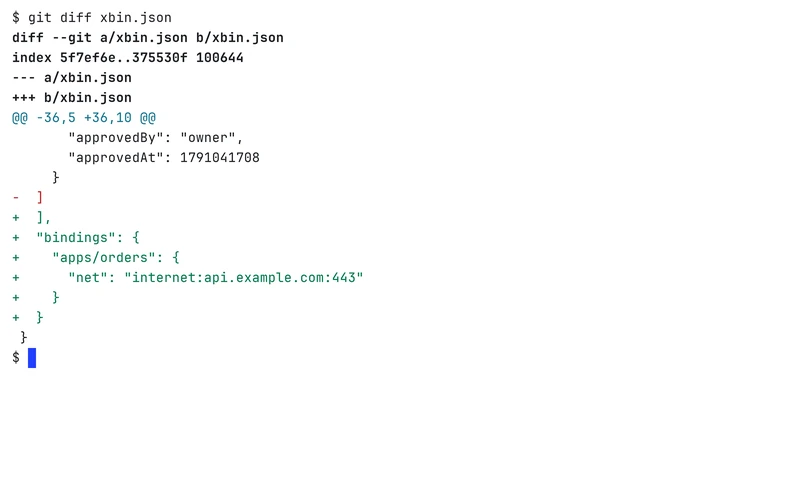
07 · The command line
bx, in your terminal.
bx is xbin’s command-line tool. Its commands are in the docs, and every workspace also serves its own documentation.
Read the docs ↗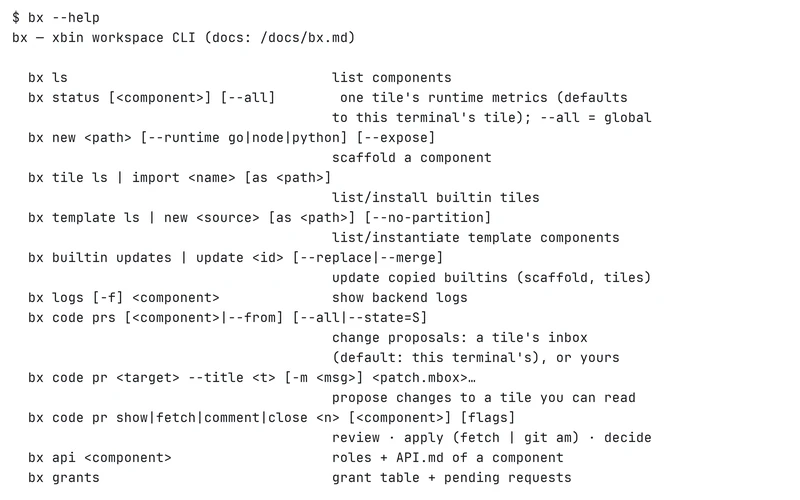
08 · The iOS app
The workspace on your iPhone.
The iOS app opens your apps in native views, runs terminals, follows agent sessions and brings your notifications. It signs in with the phone’s secure hardware.
It is in beta testing and not on the App Store yet.
About the iOS app09 · For IT
What IT checks.
- Single sign-on with OIDC or GitHub
- Organisations and roles
- An audit log
- View-as-user: an admin sees exactly what one person sees, read-only
- Sealed, encrypted backups
- Outbound network closed by default, approved per destination
- Resource limits for each app
How these figures were measured
On a big workstation: an AMD Ryzen Threadripper PRO 7995WX with 96 cores and 755 GiB of RAM, running xbin v0.3.67 on 3 October 2026 alongside other work. Each figure is the slowest sample or the 90th percentile, rounded up. A smaller machine was not measured.